
Wednesday, September 23, 2009


Thursday, September 17, 2009
Smells Like Facebook

THEME NAME: Smells like Facebook
THEME URI: http://www.nazieb.com/456/smells-like-facebook
DESCRIPTION: The exact Facebook clone theme for Wordpress. Based on Facebook profile page.
VERSION: 1.0.5
AUTHOR: Ainun Nazieb
AUTHOR URI: http://nazieb.com/
TAGS: white, blue, two-columns
Red Light

Theme Name: Red Light
Theme URI: http://www.templatelite.com/red-ligh-free-wordpress-theme/
Description: An artistic Wordpress theme with galaxy-look header and nicely-designed 3-column sidebar. Brought to you free by Templatelite.com.
Version: 1.00
Author: TemplateLite.com
Author URI: http://www.templatelite.com/
Tags: Red, Left Sidebar, Right Sidebar, Fixed Width, 3 columns, Widget Ready, Valid XHtml, Valid CSS
SoulVision

Theme Name: SoulVision
Theme URI: http://www.justdreamweaver.com/
Description: Designed by JustDreamweaver.com using the ThemeDreamer extension for WordPress themes.
Version: 1.0
Author: JustDreamweaver
Author URI: http://www.justdreamweaver.com
Wednesday, September 16, 2009
SEO Friendly Blogspot Template - Blue style 1

Many of you says that the blogger/blogspot is realy bad for SEO , it's sure...?.
..hehe.. Don't too much blamed the blogspot on the lack of your knowledge about se0 . 1n the fact that Blogger is a free service that was a powerful tool and feature to suport the online business and for sharing anything.
If we were more creative, then we could make the bl0gsp0t be seo friendly and comparable with the other web machines.
Oke, in other post I will share about how to tweaking the bl0gspot layout to be seo friendly blogspot template !
Please try SEO and Browser-Fr1endly Template below ,that it's also used to this blog now.
Free 7 Blog Style
 This is layout style that used on free 7 blog , of course this template is seo friendly and good compatibility with any browser.
Wednesday, May 27, 2009


Tuesday, February 17, 2009
Artica for Blogger
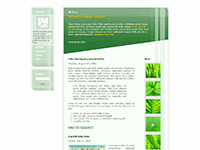

rtica for Blogger
Artica is a 3 column Blogger template with AJAX sidebar menu and bookmarklets at post pages. This template is a modification of the layout originally created by caljrimmer, which can be found at Open Source Web Design website (id 2713). Check out live demo of this template to see it fully functional.
Main features:
- Three column layout
- AJAX sidebar menu (1)
- Bookmarklets for certain social bookmarking sites at item (post) pages
- Chicklets for certain aggregator services on sidebar
- Flickr badge on the 3rd column (2)
- Integrated Google Sitesearch (3)
This is a free template released under Creative Commons Attribution-ShareAlike 2.5 License. This means that you can use this template for your personal or commercial blog, edit it according to your needs, and even re-distribute it as long as you keep the credit links at footer.
Download:


Monday, February 16, 2009


Sunday, February 15, 2009
Windows Vista blogger template
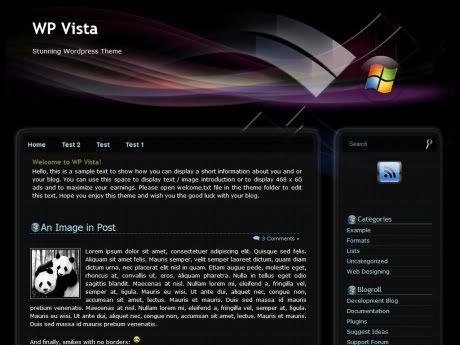
WP Vista is a new professional Theme designed by ThemeBin. It has a dark background, two columns and a header with a picture reminding Windows Vista. I converted it from Wordpress to Blogger and name it Windows Vista blogger template 
When we talk about Windows Vista, we may think about Microsoft. And when we think about Microsoft, we must know the man behind - Bill Gates. Have you heard the news that Bill Gates retired on Friday 27 June 2008 ? He leaves his full-time executive role at Microsoft, the company he founded more than three decades ago, to focus on his philanthropic organization, the Bill & Melinda Gates Foundation, the world’s largest charity, funded in part by his vast fortune. Bill Gates will become a non-executive chairman and work part-time, joined Chief Executive Steve Ballmer on stage to deliver a short speech and field questions from employees. Yes, still work but not too much :). You can read the story at PCWorld and Reuters.
Now return to our brand-new blogger template You can take a look at this template via the screenshot below or see it in action via demo link


Free Blogger Templates
Free Blogger Templates
Each of these sites contain only free themes, with only a few exceptions

ThemeLib
ThemeLib contains lots of beautiful themes that have been converted to Blogger from WP, including the most popular theme called Arthemia. You will also be able to find tips, tutorials, and news related to the blogging systems that power many of the most popular websites.
Blogger Buster
Professional Blogger themes designed, with some of the most popular themes that have been created for the platform. Once at the site, you’ll be able to find additional tips and resources for the Blogger system

bTemplates
bTemplates is a great site, containing nearly sixty pages filled with only Blogger themes. Distinct features of this site include the ability to rate themes, and the way that themes are presented and organized
JackBook
Over the past year or so, a number of highly popular templates have been released by the site JackBook, which can be found on the page linked to
eBlogTemplates

One of the largest collections of themes available for Blogger, with conversions and reviews of themes that have been released by other authors. Detailed and clear instructions have been provided with each theme released by the site’s author.
Blog and Web
Despite the fact that this site is in Spanish, you can find conversions and unique templates here for Blogger
Blog Crowds

This site features a decent set of templates, some of which have been designed for both the WordPress and Blogger platforms. Themes can be viewed by categories - style, type, number of columns, and colors.
Template-Godown
Template Godown offers some beautiful Blogger template designs, most of which are Wordpress conversions.
TemplatePanic

A rather wide selection of themes, although many appear to be sponsored with a link in the footer. Several popular themes are also featured here, however navigation is less than ideal, lacking tags dedicated to the themes
Mashable
Mashable has multiple posts with hundreds of templates compiled, all ready for download.
Blogger-Templates

The oldest resources for Blogger XML templates, and is among the most popular Blogger powered sites online.
Pyzam
There are hundreds of templates on this site, but the styles don’t vary, rather the background color/image is different, so the themes aren’t that unique. However, you can view and find themes by category, sorted by Newest/Oldest, Highest Rated, and Most Popular.
Final Sense

Twenty-six pages of templates are available for download, with varying themes and styles.
Gecko and Fly
One of the original designers of themes for Blogger, this site features a number of themes available for both WordPress and Blogger
GosuBlogger

Beautiful templates are showcased here, along with designs that readers can submit to be converted to Blogger templates, typically from other platforms, such as WordPress.
Zona Cerebral
Again in Spanish, there are additional WordPress to Blogger conversions and tips related to designing themes
Gisele Jaquenod

Gisele offers unique and pre-made designs which are specifically made for Blogger. If you are looking for a “girly” theme for your blog, this is the place to come, with templates that have categorized using tags (found in sidebar).
Falconhive
Falconhive is a new quality templates resource for Blogger. It contains lots of beautiful Blogger templates converted from Wordpress themes.
Doxs

Doxs is another Spanish site which contains 40+ beautiful and elegant blogger templates. Themes are filed by number of columns.
Inspiration
Like the WordPress site, We Love WP, you’ll find themes and websites that have been designed on the Blogger system at We Love Blogger, from the writer and designer of Blogger Buster.
Enjoy it..


Saturday, February 14, 2009
Web Design Guide for Beginner
This short article is intended as a roadmap of web designers should be made aware of. If you follow each of the following tips you will be well on your way to mastering web design.
So what is you have to do?
1. LEARN XHTML - Extensible HyperText Markup Language.
XHTML is the ‘markup language’ that every individual web page is made out of. Don’t worry, its not too difficull to learn XHTML or maybe XHTML is quite possibly the easiest programming language you can learn, so easy in fact XHTML isn’t technically classed as a programming language. You can write XHTML code in a plain text editor, such as notepad, or notepad++. You can browse Google for XHTML tutorials or head over to http://www.w3. org/MarkUp/Guide/ for a brief introduction to writing XHTML
2. LEARN CSS – Cascading Style Sheets.
CSS or Cascading Style Sheets is only a little more advanced than XHTML and most books on XHTML also cover CSS. CSS is the language that controls things such as the colour, background images, font attributes, and so on. The beauty of using CSS is you can control the aesthetic features of multiple web pages with a single CSS file.
3. LEARN PHOTOSHOP
If you are aspiring for a web design career you are going to need to learn Photoshop. In my experience, i suggest you to make up all of your web page designs in Photoshop first. Once you are entirely happy with the design start slicing and dicing your photoshop file for the images you will need, and coding the web page in XHTML and CSS.
4. TABLELESS DESIGN - USE CSS INSTEAD OF TABLES FOR YOUR DESIGNS
Use CSS to control your layout, don’t use HTML tables for your design. Tables add a lot of unnecessary code, are time consuming and expensive to make changes to once the site is completed, and only affect the layout of the single page you are working on – as opposed to using a single CSS file that affects the layout of any page you want.
5. USE VALID XHTML AND CSS
Valid XHTML and valid CSS is code that validates with the World Wide Web Consortiums coding rules. There is plenty of information on how to ensure your code is valid over at http://www.w3.org. It is important to keep this in mind, as most web design employers will not touch web designers with a ten-foot clown pole unless their code adheres with the standards of the W3C.
6. GET INSPIRED
Browse the net for good web designers, don’t steal their designs, but analyse their designs and try to figure out what fonts, colour scheme, grids, and photoshop techniques they are using. A simple way to use this is search for web design in Google, and browse the portfolios of the top web design companies that come up in the search results. Digital art and poster websites also serve as good inspiration.
7. PRACTISE PRACTISE AND PRACTISE
The more you practise, the sooner writing XHTML and CSS code will become a second nature to you, and you should also practise utilising the information from the various theories I have just mentioned too.


Creating Fast Loading Website Template
Statistics show that, without a compelling reason, the average user will not wait for much more than 10 seconds for a page to load. So does that explain why your visitors seem to spend less than 5 seconds in your site? Probably your site is taking too long to load thus putting off visitors.
As you design your site, loading time should always be a priority if your site is to be an effective business tool. Balancing usability and aesthetics is a delicate matter when creating a fast loading site.
Below are tip that you can use while designing your fast loading website.
1. Use images sparingly. Remember, images may enhance the appearance of a website but it greatly increases its loading time.
2. Use and optimize your HTML. You have to create simple and elegant sites using plain HTML, CSS and few images.
3. Minimize animated gifs and flash usage
4. Use background images
5. Avoid using Javascript and flash scripts
6. Avoid using multimedia files
7. Use Templates. Using templates will not only ensure uniformity throughout your site but will enable subsequent pages load faster because the structural images will have cached and thereby reducing the load times significantly

Creating AJAX Game
Just 1 week ago i decide to make an AJAX Game. I modify my old PHP game and integrated AJAX base on Mootools javascript framework on it. It’s work fine. 

You can try this game at: http://game.idwebtemplate.com
This game is so easy to play. Each player take bullet / ball from three box contain with 7, 5, dan 3 bullet. You can take as much as you want.
The game rule : Player which take the last bullet will be LOSE.
HOW TO INSTALL SHOUTBOX on FRIENDSTER BLOG
According to wikipedia, a shoutbox, saybox, tagboard, or chatterbox is a chat-like feature of some websites that allows people to quickly leave messages on the website, generally without any form of user registration.
In their simplest form, shoutboxes are simply lists of short messages, possibly with information about their authors. The page may be automatically refreshed after a certain interval, or polled dynamically in order to keep new messages visible. Older posts are often deleted after a certain number of messages have been written in order to preserve space on the server.
For the most part, shoutboxes are embedded into a page with inline frames or JavaScript. Many Internet forum and weblog software packages can be modified to add shoutboxes in sidebars on site pages.
Like most dynamic content, shoutboxes must interface with a database, and they query the database every time a page is requested. Additionally, a shoutbox may be loaded from a simple file. Unlike most dynamic content, however, shoutboxes are generally placed on every page of a web site, so they tend to cause disproportionate strain on databases. Therefore, care must be taken to ensure that shoutboxes do not use too many database resources. (Caching systems like memcached can be used to mitigate this to some extent, or an alternative implementation such as storing all messages in system-wide shared memory rather than a database may be used).
Now there are a lot of website provide shoutbox. One, that most popular in Indonesia and around South East Asia is oggix.com. You can add oggix shoutbox on your friendster blog by reading the manual in this link.

Subscribe to:
Posts (Atom)
